
Blobby Connect
A quick tap-to-pop puzzle game where patience pays
Features
- One tap pops a connected group of same-colored blobs
- Scoring by the square of group size: pop now, or wait for a bigger group
- Five modes: 30, 60, or 90 taps, or race the clock for one or two minutes
- A daily challenge that gives every player the same board
- A jelly board in two looks, Gummy and Glass, with light that follows your phone's tilt
- Three daily quests, the same for everyone, and a streak to keep
- Groups: private leaderboards for family and friends, joined with a code
- Opt-in leaderboards with generated display names and avatars
- Bronze-to-Platinum tiers, medals, and monthly seasons
- Stats with your play over five weeks and each mode's trend
- A post-run analysis showing how close you came to the best move each turn
- Siri and Spotlight shortcuts to start a game or check today's standings
- Color-blind friendly: every color has its own mark and a distinct brightness
Blobby Connect is a fast puzzle game for iPhone. The board is full of jelly blobs, and a tap pops any connected group of the same color. The blobs above drop into the gap, squish as they land, and new ones fall in from the top. A group of n blobs scores n², so every turn is a choice: take the points now, or set up a bigger group for later.
Runs last 30 to 90 taps, or one to two minutes, which makes it a good game for a coffee break. Each day brings a new challenge board and three quests, and groups let a family or a set of friends see who’s ahead today. Blobby Connect is currently in TestFlight beta with a small group of family and friends.
Ask Siri
Blobby Connect works with Siri, Spotlight, the Shortcuts app, and the Action button. Say the app’s name in the phrase, and Siri either opens the right game or answers with a small card, without opening the app.
| To | Say |
|---|---|
| Start the daily challenge | ”Play today’s challenge in Blobby Connect” |
| Start a game | ”Play a 60 Taps game in Blobby Connect” (or 30 Taps, 90 Taps, 1 Minute, 2 Minutes) |
| See how you’re doing today | ”How am I doing today in Blobby Connect” |
| See who’s leading a group | ”Who’s winning in Blobby Connect” |
| List your groups | ”What groups am I in in Blobby Connect” |
| Check today’s quests and your streak | ”What are my quests in Blobby Connect” |
| Hear your best score | ”What’s my best score in Blobby Connect” |
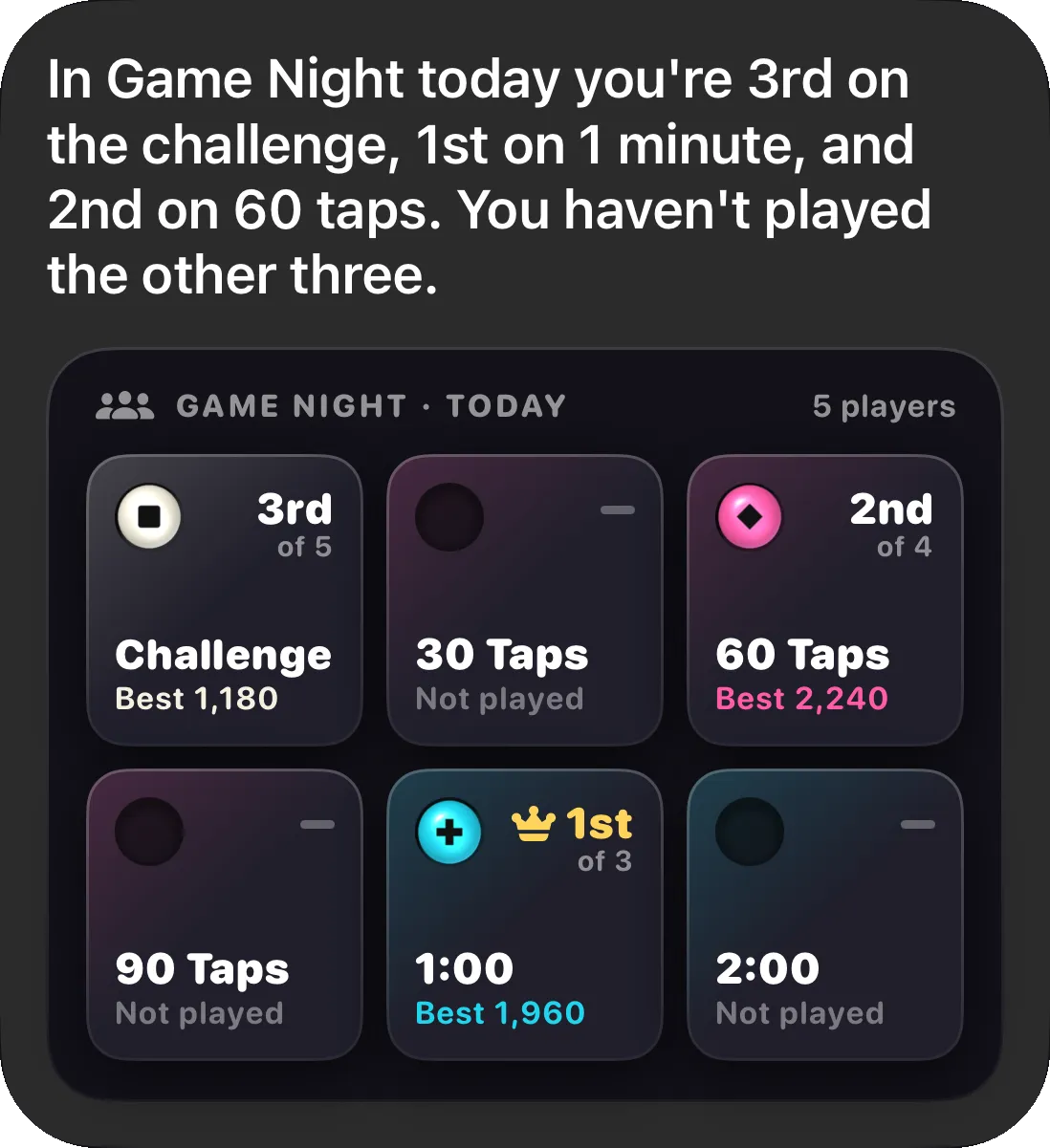
The first time you use one, Siri asks permission to use Blobby Connect. Every shortcut is also in the Shortcuts app, ready to put on the Action button.
Under the hood
- SwiftUI for menus and screens, SpriteKit for the board and pop animations
- A jelly renderer: each blob adds a soft field, and a shader lights each same-colored group as one gummy shape
- A pure, deterministic board engine kept separate from rendering, so the game rules are tested without SpriteKit
- Seeded daily boards and quests, so everyone plays the same challenge and gets the same quests each day
- Leaderboards and groups on CloudKit’s public database instead of Game Center, plus a small Cloudflare Worker that awards medals several times a day
- Siri and Spotlight through App Intents, with answer cards drawn in the menu’s tile style
- Sprites and the app icon drawn in code by small Swift tools
- Tuned with data, using simulations across 4,000 boards and analysis of real players’ runs
- Zero third-party dependencies and about 1,200 tests
How I built it
I built Blobby Connect with Claude Code, using the same spec-driven workflow as my other apps. Each feature began as a written design spec and implementation plan. Subagents then carried out the plan task by task, with a review after each task. A handoff note at the end of each session let the next one pick up exactly where the last left off.
Over about eight weeks, from mid-August to early October 2026, that came to about 600 commits, about 29,000 lines of Swift, and 34 design specs.